Bloom for Mac
Find the sentence.
Record from the menu bar or import audio and video, and Bloom writes down every word on your Mac. Search all your recordings at once, click a sentence, and hear it from that moment.
Coming soon to the Mac App Store
See how it worksFree for 14 days, then a one-time purchase. For macOS 26 or later.
How it works
Record it once. Find any moment later.
Nothing to set up and nothing to upload. Bloom sits in your menu bar until you need it.
-
0:00
Record from any app
Press ⌥⌘R wherever you are, or use the menu bar. A small controller floats over your work with the time, pause and stop. Press ⌥⌘R again to save.
-
0:48
Watch the words appear
Bloom writes down what’s said while you talk, right on your Mac. For the most accurate text, it can go over the recording again with Whisper when you stop.
-
23:14
Search, click, listen
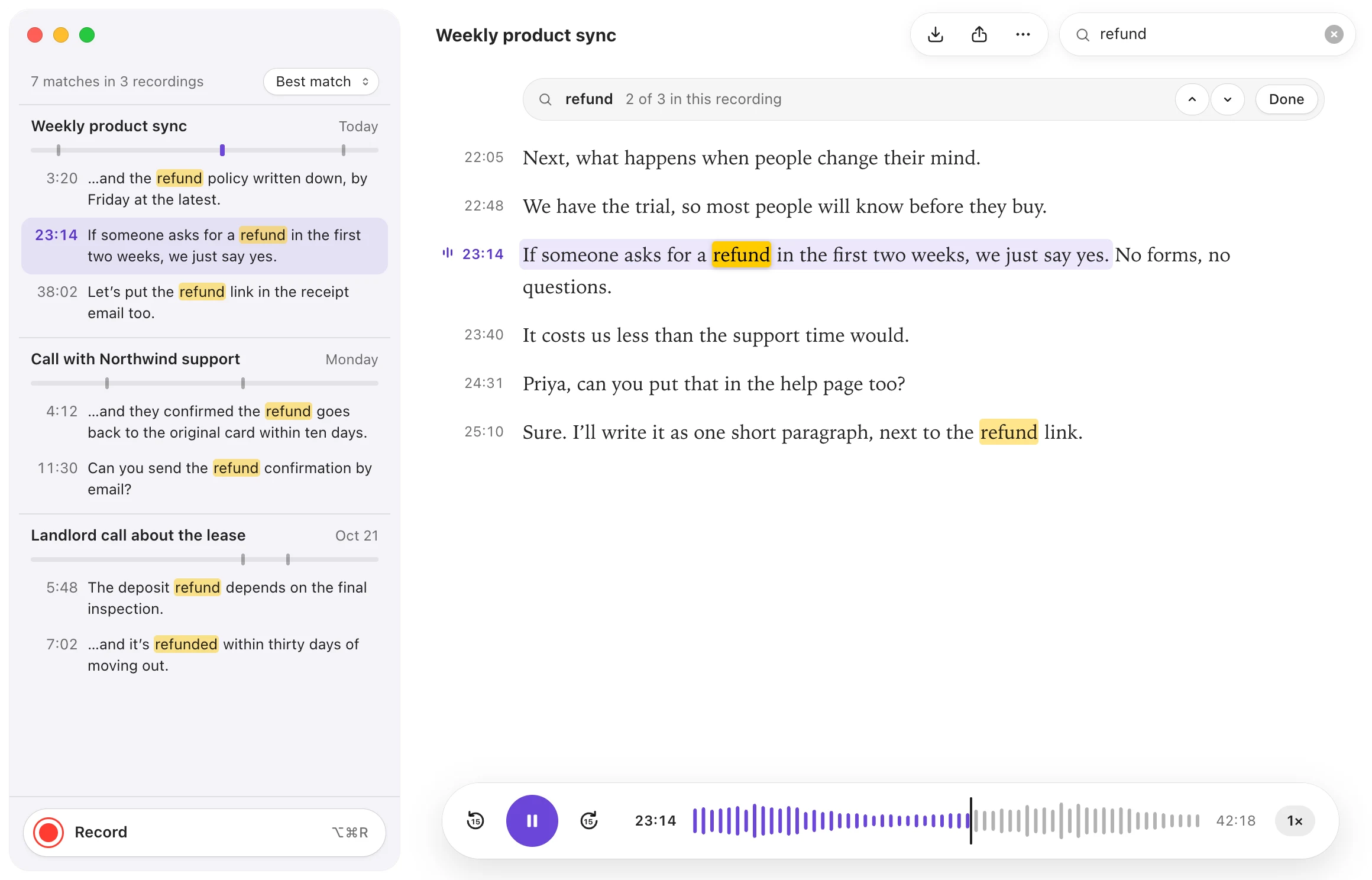
Search every recording at once; “refu” already finds “refund”. Click a result and Bloom opens the recording and plays from that sentence.
Privacy
Your recordings never leave your Mac.
There’s no Bloom server to send them to. Speech becomes text right here, by macOS or by Whisper running on your Mac.
Transcribed on your Mac
Audio and transcripts are never uploaded.
No account, no tracking
No sign-in, and Bloom doesn’t collect usage data.
Online for one thing
Downloading speech models: from Apple, or the Whisper model you choose.
Details
Made for the Mac, down to the details.
- Bring what you already have
- Drop audio or video on the window: M4A, MP3, WAV, AIFF, CAF, MP4, MOV and more. Bloom keeps a copy and transcribes each one.
- The most accurate engine, still on your Mac
- On Apple silicon, download a Whisper model once. Large v3 Turbo is the one we recommend.
- Text or subtitles
- Export plain text with or without timestamps, or SRT subtitles with the line length you choose. Or copy the transcript.
- Keyboard first
- ⌥⌘R records from any app. ⌘F searches, ⌘G jumps to the next match, ⌘E exports.
- Replay at your pace
- Skip 15 seconds either way and play from 0.75× to 2×. The sentence playing stays highlighted as the transcript follows along.
- Your colours
- Light or dark, with seven accent colours to choose from.
Pricing
Try it for two weeks. Buy it once.
Bloom is a free download, and everything is on for the first 14 days. No subscription, ever.
If you don’t buy it, your recordings aren’t locked away: you can still play, search and export every one of them.
Bloom
One-time purchase
Free for 14 days
Then buy it once and keep it.
- Everything Bloom does, no tiers
- Every Mac signed in to your Apple Account
- Shared with your family through Family Sharing
- Every version 1 update included
Coming soon to the Mac App Store
We’ll announce the price when Bloom is out.
Questions
Is anything uploaded?
No. Recording, transcription and search all happen on your Mac. Apart from App Store purchases, Bloom goes online only to download speech models.
Which Macs does Bloom run on?
Any Mac with macOS 26 or later, with Apple silicon or Intel. Whisper needs Apple silicon; on an Intel Mac, Bloom uses the speech recognition built into macOS.
Which languages can it transcribe?
The languages macOS speech recognition supports on your Mac, such as English, Chinese, German, French, Spanish, Japanese and Korean. You choose the language for each recording. Bloom itself comes in nine languages.
What happens when the trial ends?
Recording, importing and transcribing stop until you buy Bloom. Everything you made stays: you can still play, search and export it.
Where are my recordings kept?
In a library folder on your Mac, which you can move in Settings. Recordings you delete go to the Trash, so you can still get them back.
How do I get help?
Write to support@beeddy.com. Tell us your Mac model, your macOS version and what happened.
Your next recording, already searchable.
Coming soon to the Mac App Store
Free for 14 days, then a one-time purchase.